

Eligibility troubleshooting
A list of potential errors and possible resolutions when submitting 270/271 eligibility checks.
Response shapes
Stedi returns one of two response shapes, depending on the endpoint you called. Both contain the same benefits information, organized differently. You can identify them by the top-level array that organizes the patient's benefits information - either plans or benefitsInformation.
| Top-level array | Endpoints |
|---|---|
plans | Real-Time Eligibility Check JSON |
benefitsInformation | Batch Eligibility Check, Insurance Discovery, Real-Time Eligibility Check Raw X12, Real-Time Eligibility Check JSON - Legacy |
Sections with response examples or property names cover both response shapes, labeled plans and benefitsInformation. Select the label that matches the endpoint you called, and the page applies your selection to every section.
Review eligibility check errors
The Eligibility check errors page shows a list of recent eligibility check AAA error codes. These are errors the payer returns when they reject your eligibility request. They specify the reasons for rejection and any recommended follow-up actions.
To go to this page, click Error checks under All checks in the Eligibility section of the side navigation.
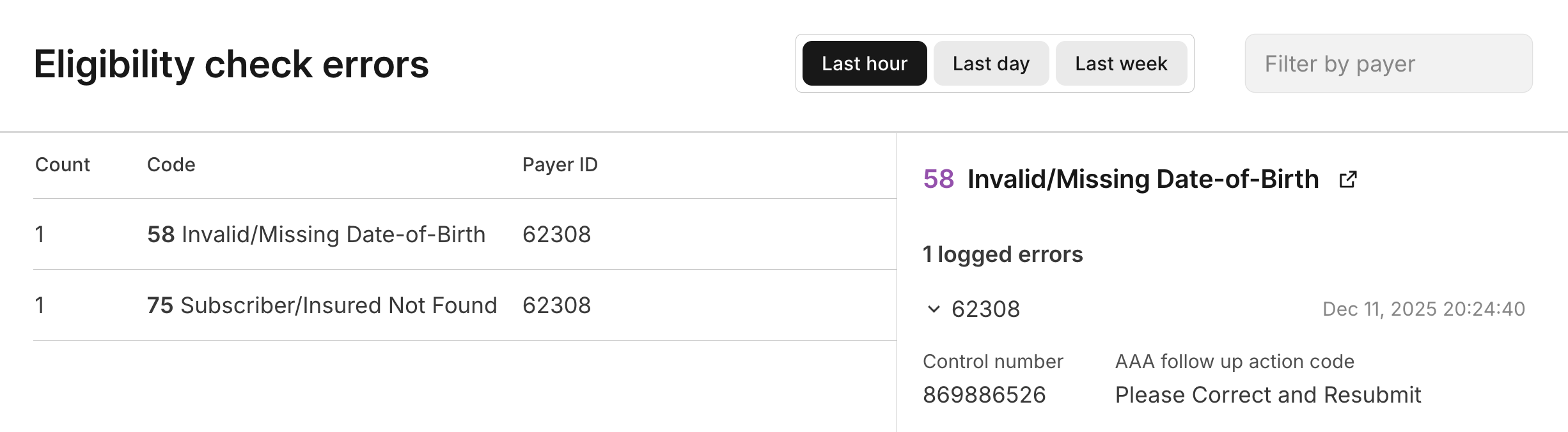
The errors are grouped by error code, and you can filter the list by Payer ID. You can look up any payer's ID in the Payer Network. Click on an error code to review a list of all the instances of that error.
This page helps you identify patterns in eligibility check failures. For example, if you see a large number of errors with code 75 (Subscriber/Insured Not Found) for a specific payer, you might want to investigate whether there are common issues with the patient data being submitted to that payer.
Visit Payer AAA errors for a complete list of AAA errors and their possible causes and resolutions.
Retry strategy
Implementing the right retry strategy for eligibility check failures saves a lot of time and money.
At a minimum, we strongly recommend automatically retrying every request that fails due to payer connectivity issues. Automatic retries resolve a significant portion of these types of failures without manual intervention.
If you're submitting eligibility checks manually through the Stedi portal, you can use Agentic Discovery to automate the retry and recovery process. Agentic Discovery automatically recovers from failures using best practices and can run insurance discovery checks if recovery fails.
Payer connectivity issues
Payers return certain AAA errors when they're temporarily down, throttling requests, or having intermittent connectivity issues. Before you retry, check the error's follow-up action, which tells you whether the payer accepts the same request again. X12 responses include it as a code in AAA04 (Follow-up Action Code). JSON responses include the code's label in the followupAction property.
Automatically retry the following AAA error scenarios:
42(Unable to Respond at Current Time)*42(Unable to Respond at Current Time)* and79(Invalid Participant Identification)80(No Response received - Transaction Terminated)
*Don't retry 42 errors with the following follow-up actions. They mean there's a problem with the request, so retrying returns the same error. Contact Stedi support instead.
C(Please Correct and Resubmit)N(Resubmission Not Allowed)S(Do Not Resubmit; Inquiry Initiated to a Third Party)
Our recommended retry strategy depends on your eligibility check workflow.
Real-time eligibility checks
For real-time eligibility checks that require a response within a few minutes, we recommend:
- Retry immediately and continue retrying for up to 2 minutes.
- The recommended retry window is based on what's acceptable in real-time human workflows. For example, a patient checking in for an appointment at their doctor's office.
- If the request is still unsuccessful, fail gracefully and escalate as needed.
Scheduled eligibility checks
You may want to run scheduled or background eligibility checks to perform periodic refreshes for a patient population or when checking eligibility for upcoming appointments.
If you're using the Batch Eligibility Check endpoint (recommended), Stedi automatically retries checks that fail due to payer connectivity issues for 8 hours by default, or up to 24 hours if you set a longer retry period. Stedi doesn't retry 42 errors with a follow-up action of C, N, or S.
If you're submitting real-time checks that can tolerate longer wait times, we recommend:
- Wait 1 minute to perform the first retry.
- Then, exponentially increase the wait between subsequent retries to up to 30 minutes between attempts.
- We recommend retrying for at least 8 hours, but the retry window should be based on your business workflows.
Other common error cases
You should also consider the following common error cases when implementing retries:
| AAA error | HTTP status | Reason | Retry strategy |
|---|---|---|---|
42 | 429 | Request rejected before processing due to temporary capacity limits, typically from exceeding allowed concurrent requests. The response's message property contains Unable to Respond at Current Time. | Retry immediately. Monitor your open concurrent requests and replace any finished requests under your Stedi account limit. |
79 | 400 | Either Stedi couldn't route the request to the payer, or the payer couldn't identify one of the participants in the request. | Don't automatically retry. Check the Payer Network to confirm the payer ID you submitted supports eligibility checks. If it does, contact Stedi support to resolve. When a 79 appears alongside a 42, follow the payer connectivity issues guidance instead. |
Some errors that Stedi finds before sending the request to the payer, such as an unrecognized payer ID or a validation error, return an HTTP 400 status with a message property and no AAA error. Other checks, such as an invalid NPI or missing portal credentials, return a Stedi-generated AAA error with an HTTP 200 status. Don't retry these requests. Correct the request first. For details, visit Stedi payer errors and Validation errors.
Can't find payer ID
You can use Stedi Agent to identify the correct payer for eligibility checks. This is helpful when:
- You're receiving
AAAerrors indicating the payer can't find the subscriber (such as code75Subscriber/Insured Not Found) - You're unsure which Stedi Payer ID matches the insurance information on the patient's card.
To identify a payer from a member card:
- Go to the Stedi Agent Chats page in the Stedi portal.
- Click New chat and select the Upload member ID card option.
- Upload a photo or scan of the front of the patient's insurance member card.
- Review the results. The agent analyzes the card and either:
- Successfully maps the information on the insurance card to a payer in Stedi's Payer Network. In this case, the agent returns information about the matching payer, including the payer's primary payer ID, Stedi payer ID, operating states, and supported transactions.
- Indicates that it cannot read the information from the card. Try taking a clearer picture and resubmitting.
- Indicates that it cannot determine the payer ID. Contact Stedi support.
Payer unable to find patient
Sometimes, a payer can't return benefits information for a patient even when the patient exists in their system. This problem can occur for a couple reasons.
Multiple matching records
Payers can have multiple records of patients with the same name and date of birth. The payer cannot return benefits information unless they are able to identify a unique match within their system.
To avoid this issue, we recommend:
- Include all of the demographic information available for a patient.
- Include the patient's member ID, if available.
Information discrepancies
There can be discrepancies between the information the provider has collected from the patient and the record the payer has in their system. These discrepancies can lead to issues returning a patient, even though a match exists. Some examples include differences in spelling the patient's name, using a nickname instead of the full name ("Nick" vs. "Nicolas"), and accidentally transposing numbers in the date of birth.
If a request fails to return the expected member in the response, we recommend progressively sending additional eligibility check requests with fewer patient identity and demographic data elements, or different combinations of those. This allows you to identify and handle cases where there are data errors or discrepancies between payer and provider data.
Name mismatches
If the payer fails to find a matching plan member due to a name mismatch, the errors array in the response typically has the code set to one of the following values:
65: Invalid/Missing Patient Name67: Patient Not Found73: Invalid/Missing Subscriber/Insured Name75: Subscriber/Insured Not Found
These error codes are set by the payer, not by Stedi, so it's possible that other error codes could be returned.
Resolving the error may require trying different name variations until the check is successful.
- Replace any nickname or shortened name with the full legal name, for example "Robert" instead of "Bob".
- Replace any non-English or accented characters (letters with diacritical marks) such as "Ñ" or "é" with the closest equivalent within the character restrictions. Stedi automatically replaces most such characters with the usual closest equivalent but this might not match the payer's record. For example, the character "Đ" could be transliterated to "D" or "J" depending on the romanization system used.
- For compound names try using only one or the other part. You can also try try removing the separator, or changing the separator from hyphen to space, or vice versa. Some payers may ignore special or separator characters when performing name searches.
- If the patient has recently changed their name, for example due to marriage, then the name stated by the patient or printed on their ID card might not match the payer's record. Try both the current and previous name.
CMS attestation required
CMS requires providers to complete attestation (also called HETS EDI Enrollment) before running Medicare eligibility checks. This requirement applies to traditional Medicare only, not Medicare Advantage (Part C) or Part D plans.
If you submit a Medicare eligibility check without completing attestation, CMS rejects the request with an AAA error with code 41 (Authorization/Access Restrictions).
To resolve this error, complete the CMS eligibility enrollment requirement for the billing NPI. Attestation takes approximately 5-15 minutes per NPI.
Portal credentials
The following payers are some of the few that require additional credentials to process eligibility checks:
- Medicaid California (Payer ID:
100065) | Provider Portal - Kern Family Health Care (Payer ID:
77039) | Provider Portal - AltaMed (Payer ID:
ALTAM) | Provider Portal
When submitting eligibility checks to these payers, you must include the Provider Identification Number (PIN) the requesting provider uses for the Medi-Cal program. This PIN will be different for each provider.
- JSON endpoint: Set the
provider.additionalInformation.personalIdentificationNumberproperty to the provider's PIN. - Legacy JSON endpoint: Set the
portalPasswordproperty to the provider's PIN. You can omit theportalUsername. - Batch Eligibility Check endpoint: Set the
portalPasswordproperty in each item to the provider's PIN. You can omitportalUsername. - Raw X12 and SOAP endpoints: Include the provider's PIN in
Loop 2100B REF02whenREF01is set to4A(Personal Identification Number (PIN)). - Stedi portal: To add this field to the eligibility check form, click Select fields and check the box next to Personal identification number.
If you don't include the provider's PIN or if the PIN is invalid, you'll receive an AAA error with code 41 (Authorization/Access Restrictions) at the payer or provider level.
Missing member ID
Our eligibility check endpoints require submitting at least one of the patient's member ID, date of birth, or last name in the request. However, some payers always require the member ID and reject requests without it.
Stedi tracks which payers require the member ID and returns a warning when you submit an eligibility check to one of those payers without it. The warning appears in the warnings array along with the AAA error from the payer in the errors array.
  {
    "warnings": [
      {
        "code": "request::270::member_id_required",
        "description": "This payer requires the patient's member ID to be included in eligibility requests."
      }
    ],
    "errors": [
      {
        "code": "72",
        "description": "Invalid/Missing Subscriber/Insured ID",
        ...
      }
    ],
    ...
  }
Eligibility check requirements vary by payer. If we don't know whether a payer requires the member ID for eligibility checks, we don't return a warning.
Unsupported request properties
The Real-Time Eligibility Check (270/271) JSON - Legacy endpoint doesn't reject a request that contains property names it doesn't recognize. Stedi ignores those properties, runs the eligibility check with the rest of the request, and returns a warning listing what it ignored.
If you're not getting the results you expected, review the warnings array. Stedi never sends an ignored property to the payer, so a check can succeed while missing information you meant to include, and the results won't reflect the data you thought you sent.
The warning uses the code request::unsupported_field_names, and Stedi lists every unsupported property in a single warning. Stedi identifies each property with a JSON Pointer path, using / as a separator and an index number for array entries. For example, /dependents/0/firstNames. Check the property names against the API reference and resubmit.
In the following example, the request misspelled memberId as memberID and used serviceTypeCode instead of serviceTypeCodes. Stedi ignored both, so it ran the check without the patient's member ID and without the requested service types.
{
  "warnings": [
    {
      "code": "request::unsupported_field_names",
      "description": "The following request field(s) are not supported: `/subscriber/memberID`, `/encounter/serviceTypeCode`. You may want to check these field names against Stedi's API Reference and resubmit."
    }
  ]
}
The Real-Time Eligibility Check (270/271) JSON endpoint rejects requests that contain unsupported property names instead of returning a warning.
Errors
You may encounter the following types of errors when submitting eligibility requests.
Stedi payer errors
When Stedi can't process your eligibility check because of the payer ID you provided, it returns an HTTP 400 status code.
The response contains a message property with one of the following messages:
| Error message | Possible causes and resolutions |
|---|---|
Payer {payer ID} (Stedi Payer ID {Stedi payer ID}) is not configured for {transaction type}. Please check our published payer list or contact Stedi support to resolve. | Stedi doesn't yet support this transaction type for this payer, or there's a mis-mapping of payer IDs. Contact us with the name of the payer, and we'll investigate the issue. |
Payer {payer ID} is not configured. Please check our published payer list or contact Stedi support to resolve. | Stedi doesn't recognize the payer ID you provided. Double-check the payer ID in the Stedi Payer Network, or contact us with the name of the payer, and we'll help you determine the correct payer ID. |
The following error resulted from an unrecognized payer ID:
{
  "message": "Payer AHS is not configured. Please check our published payer list or contact Stedi support to resolve."
}
An HTTP 400 response with an AAA 79 (Invalid Participant Identification) error in the errors array means something different. Either Stedi couldn't route the request to the payer, or the payer couldn't identify one of the participants in the request. In this case, the message property contains One of the participants in the request could not be identified. Check the payer ID, provider identifiers and member details against the payer's requirements.
Validation errors
You may receive validation errors from Stedi or, rarely, from the payer.
Stedi
Stedi validates the structure of your eligibility request and won't submit your request to the payer if it's missing required fields or if its data uses an invalid format. Instead, Stedi returns an HTTP 400 status code.
The following Stedi validation error resulted from a request without a provider identifier:
{
  "message": "Missing required field: provider npi, tin, ssn, ein, serviceProviderNumber, or pharmacyProcessorNumber"
}
The following Stedi validation error resulted from an invalid date format. Dates must use the YYYY-MM-DD format. The errors array lists each property that failed validation.
{
  "message": "1 validation error detected. Value at '/subscriber/dateOfBirth' failed to satisfy constraint: Member must satisfy regular expression pattern: ^\\d{4}-(0[1-9]|1[0-2])-(0[1-9]|[12]\\d|3[01])$",
  "errors": [
    {
      "path": "/subscriber/dateOfBirth",
      "message": "Value at '/subscriber/dateOfBirth' failed to satisfy constraint: Member must satisfy regular expression pattern: ^\\d{4}-(0[1-9]|1[0-2])-(0[1-9]|[12]\\d|3[01])$"
    }
  ]
}
Payer (999 rejections)
Stedi's validation catches the majority of syntax and structural issues. However, some payers may occasionally return a 999 Implementation Acknowledgment indicating that the request was rejected.
Stedi can usually translate these 999 rejections into a more user-friendly 271 response with descriptive AAA errors in the errors array.
When Stedi can't generate a 271, the response contains the raw 999 in the x12 property and an error with code 999 in the errors array. The error's possibleResolutions property explains that the payer rejected the request because of validation errors.
The following example shows a 999 rejection:
{
  "id": "ec_019c00bb-2293-7241-b283-9b94642b4ec4",
  "eligibilitySearchId": "019c00bb-229e-72c3-8585-8b28f0556a38",
  "meta": {
    "outboundTraceId": "01KG0BP8NA69HK7095HE8XG03F"
  },
  "payerId": "TESTPAYER",
  "payer": {
    "type": "PAYER",
    "identification": "TESTPAYER"
  },
  "errors": [
    {
      "code": "999",
      "description": "Implementation Acknowledgment",
      "followupAction": "Please Correct and Resubmit",
      "location": "ENVELOPE",
      "possibleResolutions": "The payer or intermediary clearinghouse rejected the request with validation errors. The original EDI is returned in the `x12` field. Contact Stedi Support if you need further help."
    }
  ],
  "x12": "..."
}
Payer AAA errors
When a payer rejects your eligibility check, the 271 response contains one or more AAA Request Validation segments that specify the reasons for the rejection and any recommended follow-up actions. Stedi includes this information in the JSON response.
Common causes for AAA errors include:
- Missing or incorrect information for the subscriber, dependent, provider, or payer. In this case, you should correct any errors before resubmitting.
- Issues with payer enrollment. Many of these issues require that the provider contact the payer directly to resolve, due to PHI/HIPAA guidelines.
- The payer's system is down or experiencing issues. In this case, the payer may not have actually validated the data in your request. If you receive these types of errors, you should wait a few minutes and resend the request again.
Each error includes a follow-up action that tells you what to do next. X12 responses include it as a code in AAA04 (Follow-up Action Code). JSON responses include the code's label in the followupAction property.
| X12 code | followupAction |
|---|---|
C | Please Correct and Resubmit |
N | Resubmission Not Allowed |
P | Please Resubmit Original Transaction |
R | Resubmission Allowed |
S | Do Not Resubmit; Inquiry Initiated to a Third Party |
W | Please Wait 30 Days and Resubmit |
X | Please Wait 10 Days and Resubmit |
Y | Do Not Resubmit; We Will Hold Your Request and Respond Again Shortly |
AAA errors appear in the top-level errors array. The location property tells you where the error occurred. Use the matching table to find possible causes and resolutions:
ENVELOPEandPAYER: Payer tablePROVIDER: Provider tableSUBSCRIBERandSUBSCRIBER_BENEFITS: Subscriber tableDEPENDENTandDEPENDENT_BENEFITS: Dependents table
The following example shows an error at the subscriber level:
{
  "id": "ec_550e8400-e29b-41d4-a716-446655440000",
  "payer": {
    "type": "PAYER",
    "name": { "organization": "Aetna" }
  },
  "errors": [
    {
      "code": "72",
      "description": "Invalid/Missing Subscriber/Insured ID",
      "followupAction": "Please Correct and Resubmit",
      "location": "SUBSCRIBER",
      "possibleResolutions": "The subscriber's member ID is either missing or invalid.\n• Check the `subscriber.memberId`.\n• Ensure the member ID doesn't include the [Card Issuer Identifier](https://www.stedi.com/docs/healthcare/eligibility-troubleshooting#card-issuer-identifier-80840).\n• If you can't locate the correct member ID, try running an [insurance discovery check](https://www.stedi.com/docs/healthcare/insurance-discovery) to retrieve the patient's benefits information instead."
    }
  ],
  "x12": "..."
}
Visit Eligibility mock requests to retrieve more examples of common AAA errors in eligibility responses.
To help with troubleshooting, we include additional strings containing
possible causes and resolutions for each AAA error. We periodically update
this guidance, so these strings may change at any time and may differ between
eligibility responses. Don't build programmatic logic that depends on
matching these strings exactly.
Payer
You may receive the following types of errors at the payer level.
| Code | Description | Possible causes and resolutions |
|---|---|---|
04 | Authorized Quantity Exceeded | You included too many patients in the request - you can only request benefits information for one patient at a time.
|
41 | Authorization/Access Restrictions | The problem is either:
|
42 | Unable to Respond at Current Time |
|
79 | Invalid Participant Identification | There is a problem connecting with this payer. Contact Stedi support. |
80 | No Response received - Transaction Terminated | The payer can't respond to your request. This is typically a temporary issue with the payer's system, such as downtime, but it can also be an extended outage. We recommend retrying immediately and continuing to retry for up to 2 minutes. Learn more about our recommended retry strategy for payer connectivity issues. |
T4 | Payer Name or Identifier Missing | The problem is either:
|
Provider
You may receive the following types of errors at the provider level.
| Code | Description | Possible causes and resolutions |
|---|---|---|
15 | Required application data missing | The payer needs more information about the provider requesting the eligibility check. Try including the provider.tin, typically their EIN or SSN. |
41 | Authorization/Access Restrictions | The problem is either:
|
43 | Invalid/Missing Provider Identification | The problem is either:
|
44 | Invalid/Missing Provider Name | The provider's NPI is registered with an incorrect name for this payer.
|
45 | Invalid/Missing Provider Specialty | The provider's NPI isn't registered with the payer under the correct specialty. The provider must contact the payer directly to resolve this issue due to PHI/HIPAA guidelines. The payer may require other credentialing or enrollment processes. |
46 | Invalid/Missing Provider Phone Number | The provider's phone number doesn't match the one registered with the payer or the one in the NPPES system. The provider must contact the payer directly to resolve this issue because of PHI/HIPAA guidelines. The payer may require other credentialing or enrollment processes. |
47 | Invalid/Missing Provider State | The provider.address either doesn't match the address registered with the payer or it doesn't match the provider's address in the NPPES system.
|
48 | Invalid/Missing Referring Provider Identification Number | The referring provider (specified in subscriber.provider.code and subscriber.provider.reference, or dependent.provider.code and dependent.provider.reference when the patient is a dependent) either:
|
50 | Provider Ineligible for Inquiries | The provider requesting the eligibility check isn't registered with the payer for the service type in the encounter.services[] entries with system STC.
|
51 | Provider Not on File | The provider isn't registered with the payer.
|
79 | Invalid Participant Identification | There is a problem connecting with this payer. Contact Stedi support. |
97 | Invalid or Missing Provider Address | The payer requires the address for the provider requesting the eligibility check. Retry with the provider's complete address in the provider.address object. |
T4 | Payer Name or Identifier Missing | The problem is either:
|
Subscriber
You may receive the following types of errors at the subscriber level.
| Code | Description | Possible causes and resolutions |
|---|---|---|
15 | Required application data missing | The payer likely needs more information about the subscriber to complete the eligibility check. We recommend providing subscriber.memberId, subscriber.dateOfBirth, subscriber.name.person.firstName, and subscriber.name.person.lastName. Given this information, all payers must return benefits details as long as they can find a unique match for the member within their system. Visit patient information to learn more.
|
33 | Input Errors | The request doesn't meet the payer's requirements, which usually means it doesn't contain enough information to identify the patient. We recommend providing subscriber.memberId, subscriber.dateOfBirth, subscriber.name.person.firstName, and subscriber.name.person.lastName. Given this information, all payers must return benefits details as long as they can find a unique match for the member within their system. Visit patient information to learn more. |
35 | Out of Network | The subscriber isn't in the provider's network.
|
42 | Unable to Respond at Current Time |
|
43 | Invalid/Missing Provider Identification | The problem is either:
|
45 | Invalid/Missing Provider Specialty | The provider.npi isn't registered with the payer under the correct specialty. The provider must contact the payer directly to resolve this issue due to PHI/HIPAA guidelines. |
47 | Invalid/Missing Provider State | The provider.address either doesn't match the address registered with the payer, or it doesn't match the provider's address in the NPPES system.
|
48 | Invalid/Missing Referring Provider Identification Number | The referring provider (specified in subscriber.provider.code and subscriber.provider.reference) either:
|
49 | Provider is Not Primary Care Physician | The payer doesn't list the provider as a primary care physician but requires them to be one. The provider or the patient must contact the payer to update their records. |
51 | Provider Not on File | The provider isn't registered with the payer.
|
52 | Service Dates Not Within Provider Plan Enrollment | The provider wasn't registered with the patient's health plan on the date of service listed in the eligibility check.
|
53 | Inquired Benefit Inconsistent with Provider Type Enrollment | The provider isn't registered with the payer to perform the requested benefit type. Some payers only return benefits that match the provider's taxonomy code.
|
54 | Inappropriate Product/Service ID Qualifier | You provided an invalid encounter.services[].system. Update the request and resubmit. |
55 | Inappropriate Product/Service ID | You provided an invalid encounter.services[].value. Update the request and resubmit. |
56 | Inappropriate Date | The service dates in encounter.dates.service are incorrect or are formatted incorrectly.
|
57 | Invalid/Missing Date(s) of Service | The service dates in encounter.dates.service are incorrect or are formatted incorrectly.
|
58 | Invalid/Missing Date-of-Birth | The payer needs the subscriber's date of birth for identification.
|
60 | Date of Birth Follows Date(s) of Service | The date(s) of service you provided are earlier than the subscriber's date of birth.
|
61 | Date of Death Precedes Date(s) of Service | The date(s) of service you provided are after the patient's date of death.
|
62 | Date of Service Not Within Allowable Inquiry Period | The payer doesn't support the date(s) of service you provided.
|
63 | Date of Service in Future | Some payers don't support future date(s) of service.
|
69 | Inconsistent with Patient's Age | The diagnosis codes provided don't match the patient's age.
|
70 | Inconsistent with Patient's Gender | The procedure codes provided are inconsistent with the patient's gender.
|
71 | Patient Birth Date Does Not Match That for the Patient on the Database | The subscriber's birth date doesn't match what's in the payer's database.
|
72 | Invalid/Missing Subscriber/Insured ID | The subscriber's member ID is either missing or invalid.
|
73 | Invalid/Missing Subscriber/Insured Name | The payer doesn't recognize the subscriber's name.
|
74 | Invalid/Missing Subscriber/Insured Gender Code | The payer requires the subscriber's gender code. Ensure subscriber.gender is set to a valid value that matches the payer's records. |
75 | Subscriber/Insured Not Found | The payer couldn't locate the subscriber in their database.
|
76 | Duplicate Subscriber/Insured ID Number | The payer found another member with the same member ID in their database. Ensure the subscriber.memberId is correct. |
78 | Subscriber/Insured Not in Group/Plan identified | The subscriber isn't in the specified health plan.
|
98 | Experimental Service or Procedure | Contact the payer for guidance. |
AA | Authorization Number Not Found | The prior authorization number the payer has on file doesn't match the one you sent. Verify that the encounter.additionalInformation.priorAuthNumber or encounter.additionalInformation.referralNumber is correct. |
AE | Requires Primary Care Physician Authorization | The payer requires a prior authorization number. Add the encounter.additionalInformation.priorAuthNumber or encounter.additionalInformation.referralNumber to your request and resubmit. |
AF | Invalid/Missing Diagnosis Code(s) | The payer requires one or more diagnosis codes, or the diagnosis codes you provided are invalid. Check the patient's diagnosis codes. |
AG | Invalid/Missing Procedure Code(s) | The payer requires a procedure code or the procedure code you provided is invalid. Ensure encounter.services[].system and encounter.services[].value are set to valid values. |
AO | Additional Patient Condition Information Required | Contact the payer for guidance. |
CI | Certification Information Does Not Match Patient | The prior authorization number the payer has on file doesn't match the one you sent. Verify that the encounter.additionalInformation.priorAuthNumber or encounter.additionalInformation.referralNumber is correct. |
E8 | Requires Medical Review | Contact the payer for guidance. |
IA | Invalid Authorization Number Format | The encounter.additionalInformation.priorAuthNumber or encounter.additionalInformation.referralNumber wasn't formatted correctly. |
MA | Missing Authorization Number | You must include a previously issued referral or authorization number in your request. Set encounter.additionalInformation.priorAuthNumber or encounter.additionalInformation.referralNumber and resubmit. |
Dependents
You may receive the following types of errors at the dependent level.
| Code | Description | Possible causes and resolutions |
|---|---|---|
15 | Required application data missing | The payer needs more information about the dependent to complete the eligibility check. We recommend providing dependent.name.person.firstName, dependent.name.person.lastName, and dependent.dateOfBirth, when possible. Many payers return errors when the dependent's date of birth is missing.
|
33 | Input Errors | The request doesn't meet the payer's requirements, which usually means it doesn't contain enough information to identify the patient.
|
35 | Out of Network | The dependent isn't in the provider's network.
|
42 | Unable to Respond at Current Time |
|
43 | Invalid/Missing Provider Identification | The problem is either:
|
45 | Invalid/Missing Provider Specialty | The provider.npi isn't registered with the payer under the correct specialty. The provider must contact the payer directly to resolve this issue due to PHI/HIPAA guidelines. |
47 | Invalid/Missing Provider State | The provider.address either doesn't match the address registered with the payer, or it doesn't match the provider's address in the NPPES system.
|
48 | Invalid/Missing Referring Provider Identification Number | The referring provider (specified in dependent.provider.code and dependent.provider.reference) either:
|
49 | Provider is Not Primary Care Physician | The payer doesn't list the provider as a primary care physician, but requires them to be one. The provider or the patient must contact the payer to update their records. |
51 | Provider Not on File | The provider isn't registered with the payer.
|
52 | Service Dates Not Within Provider Plan Enrollment | The provider wasn't registered with the patient's health plan on the date of service listed in the eligibility check.
|
53 | Inquired Benefit Inconsistent with Provider Type Enrollment | The provider isn't registered with the payer to perform the requested benefit type. Some payers only return benefits that match the provider's taxonomy code.
|
54 | Inappropriate Product/Service ID Qualifier | You provided an invalid encounter.services[].system. Update the request and resubmit. |
55 | Inappropriate Product/Service ID | You provided an invalid encounter.services[].value. Update the request and resubmit. |
56 | Inappropriate Date | The service dates in encounter.dates.service are incorrect or are formatted incorrectly.
|
57 | Invalid/Missing Date(s) of Service | The service dates in encounter.dates.service are incorrect or are formatted incorrectly.
|
58 | Invalid/Missing Date-of-Birth | The payer needs the dependent's date of birth for identification.
|
60 | Date of Birth Follows Date(s) of Service | The date(s) of service you provided are earlier than the dependent's date of birth.
|
61 | Date of Death Precedes Date(s) of Service | The date(s) of service you provided are after the dependent's date of death.
|
62 | Date of Service Not Within Allowable Inquiry Period | The payer doesn't support the date(s) of service you provided.
|
63 | Date of Service in Future | Some payers don't support future date(s) of service.
|
64 | Invalid/Missing Patient ID | The payer requires an additional identifier in the dependent.additionalInformation object.
|
65 | Invalid/Missing Patient Name | The payer doesn't recognize the dependent's name.
|
66 | Invalid/Missing Patient Gender Code | The payer requires the dependent's gender code. Ensure dependent.gender is set to a valid value that matches the payer's records. |
67 | Patient Not Found | The payer couldn't locate the dependent in their database.
|
68 | Duplicate Patient ID Number | The payer found another member with the same member ID in their database. Ensure subscriber.memberId is correct, and dependent.additionalInformation.memberId if you sent one. |
69 | Inconsistent with Patient's Age | The diagnosis codes provided don't match the patient's age.
|
70 | Inconsistent with Patient's Gender | The procedure codes provided are inconsistent with the patient's gender.
|
71 | Patient DOB Does Not Match That for the Patient on the Database | The dependent's birth date doesn't match what's in the payer's database.
|
77 | Subscriber Found, Patient Not Found | The payer identified the subscriber in their database, but not the dependent.
|
98 | Experimental Service or Procedure | Contact the payer for guidance. |
AA | Authorization Number Not Found | The prior authorization number the payer has on file doesn't match the one you sent. Verify that the encounter.additionalInformation.priorAuthNumber or encounter.additionalInformation.referralNumber is correct. |
AE | Requires Primary Care Physician Authorization | The payer requires a prior authorization number. Add the encounter.additionalInformation.priorAuthNumber or encounter.additionalInformation.referralNumber to your request and resubmit. |
AF | Invalid/Missing Diagnosis Code(s) | The payer requires diagnosis codes, or the diagnosis codes you provided were invalid. Check the patient's diagnosis codes. |
AG | Invalid/Missing Procedure Code(s) | The payer requires a procedure code or the procedure code you provided is invalid. Ensure encounter.services[].system and encounter.services[].value are set to valid values. |
AO | Additional Patient Condition Information Required | Contact the payer for guidance. |
CI | Certification Information Does Not Match Patient | The prior authorization number the payer has on file doesn't match the one you sent. Verify that the encounter.additionalInformation.priorAuthNumber or encounter.additionalInformation.referralNumber is correct. |
E8 | Requires Medical Review | Contact the payer for guidance. |
IA | Invalid Authorization Number Format | The encounter.additionalInformation.priorAuthNumber or encounter.additionalInformation.referralNumber wasn't formatted correctly. |
MA | Missing Authorization Number | You must include a previously issued referral or authorization number in your request. Set encounter.additionalInformation.priorAuthNumber or encounter.additionalInformation.referralNumber and resubmit. |
Card Issuer Identifier (80840)
All health plans use (80840) as the first five digits of the Card Issuer Identifier.
This is a placeholder value used for standards compliance only, and you shouldn't pass it in an electronic eligibility check. However, many providers and OCR systems accidentally pass (80840) in other eligibility check fields. For example, they may try to pass this value as a subscriber or dependent ID, causing an AAA rejection from the payer.
To prevent these types of mistakes, Stedi removes a leading (80840) from member IDs and supplemental identifiers, along with a colon directly after it. If fewer than two characters remain in the member ID, Stedi removes the member ID from the request. Stedi also removes any subscriber or dependent supplemental identifier that contains a character other than a letter, number, or hyphen.
Stedi applies these changes to the following fields:
| JSON | X12 EDI |
|---|---|
subscriber.memberId | Loop 2100C NM109 (Subscriber Primary Identifier) |
Any property in subscriber.additionalInformation | Loop 2100C REF02 (Subscriber Supplemental Identifier) |
Any property in dependent.additionalInformation | Loop 2100D REF02 (Dependent Supplemental Identifier) |
If the payer's eligibility response contains an AAA error, Stedi returns the following warning in the warnings array:
{
  "code": "response::271::placeholder_prefix",
  "description": "One or more subscriber/dependent identifiers contain the string \"(80840)\", which is a known placeholder prefix for a field that should not be provided. We have omitted that value in the request, and the request failed. Please locate the correct value for the identifier(s) and resubmit."
}
To correct this error, read the documentation for the corresponding field, locate the correct value, and resubmit the eligibility check.
SOAP requests
Our Real-Time Eligibility Check SOAP endpoint respects the error handling rules defined in the CAQH CORE vC2.2.0 Rule.
At a high level, you can experience errors in the following categories:
- Authentication errors: Either your API key, your Stedi account ID, or both are invalid.
- SOAP faults: Issues with the request
EnvelopeorHeaderelements, such as malformed XML. - CORE-compliant errors: The request don't conform to CAQH CORE rules for eligibility checks.
- X12 EDI validation errors: The X12 EDI transaction doesn't match the required format.
- Too many requests errors: You've exceeded your concurrency limit.
- Payer
AAAerrors: Errors from the payer indicating issues with processing your request.
Authentication errors
If the wsse:Username or wsse:Password values are incorrect within the Header element:
- Stedi returns an HTTP
401status code. - The response includes an
ErrorCodeelement set toUnAuthorized.
The following example shows an authentication error response:
<soapenv:Envelope xmlns:soapenv="http://www.w3.org/2003/05/soap-envelope">
  <soapenv:Body>
    <COREEnvelopeRealTimeResponse>
      <PayloadType>CoreEnvelopeError</PayloadType>
      <ProcessingMode>RealTime</ProcessingMode>
      <PayloadID>01987b7e-56cc-7871-8520-a22721948fb4</PayloadID>
      <TimeStamp>2025-08-06T22:23:50Z</TimeStamp>
      <CORERuleVersion>2.2.0</CORERuleVersion>
      <Payload></Payload>
      <ErrorCode>UnAuthorized</ErrorCode>
      <ErrorMessage>Invalid username and/or password.</ErrorMessage>
    </COREEnvelopeRealTimeResponse>
  </soapenv:Body>
</Envelope>
SOAP faults
SOAP faults indicate issues with the request Envelope or Header elements, such as malformed XML or missing required elements.
When these errors occur:
- Stedi returns an HTTP
400status code. - The response includes a
Faultelement that contains details about the error. TheFaultelement always contains aCodeandReasonelement. TheCodeelement indicates the source of the error and theReasonelement provides a description.
The following example shows a SOAP fault response:
<soapenv:Envelope xmlns:soapenv="http://www.w3.org/2003/05/soap-envelope/" xmlns:xsd="http://www.w3.org/2001/XMLSchema"
    xmlns:xsi="http://www.w3.org/2001/XMLSchema-instance">

    <soapenv:Body>
        <soapenv:Fault>
            <soapenv:Code>
                <soapenv:Value>soapenv:Sender</soapenv:Value>
            </soapenv:Code>
            <soapenv:Reason>
                <soapenv:Text xml:lang="en">Unable to parse payload as CORE SOAP request</soapenv:Text>
            </soapenv:Reason>
        </soapenv:Fault>
    </soapenv:Body>

</soapenv:Envelope>
Visit the SOAP Fault documentation for more details and a complete list of possible error codes.
CORE-compliant errors
These errors typically indicate issues with the COREEnvelopeRealTimeRequest element that contains the request body. However, they can sometimes indicate specific issues with the SOAP Envelope or Header elements, such as an incorrect SOAP version or invalid credentials.
When these errors occur:
- Stedi returns an HTTP
400status code. - The
COREEnvelopeRealTimeResponseelement contains anErrorCodeandErrorMessagewith a description. - The
Payloadelement is empty because Stedi didn't process the eligibility check.
The following example shows a CORE-compliant error response:
<soapenv:Envelope xmlns:soapenv="http://www.w3.org/2003/05/soap-envelope">
  <soapenv:Body>
    <COREEnvelopeRealTimeResponse>
      <PayloadType>CoreEnvelopeError</PayloadType>
      <ProcessingMode>RealTime</ProcessingMode>
      <PayloadID>01987b70-2b7e-7b40-9875-10d3139dcf2a</PayloadID>
      <TimeStamp>2025-08-06T22:23:50Z</TimeStamp>
      <SenderID>TestStedi</SenderID>
      <ReceiverID>Stedi</ReceiverID>
      <CORERuleVersion>2.2.0</CORERuleVersion>
      <Payload></Payload>
      <ErrorCode>PayloadIDIllegal</ErrorCode>
      <ErrorMessage>Illegal value provided for PayloadID. Must be a valid UUID</ErrorMessage>
    </COREEnvelopeRealTimeResponse>
  </soapenv:Body>
</soapenv:Envelope>
The following table lists the possible values for ErrorCode and and their causes:
| Error Code | Possible Causes |
|---|---|
CORERuleVersionIllegal | The CORERuleVersion element is not set to 2.2.0. |
CORERuleVersionRequired | The CORERuleVersion element is missing from the request. Set this to 2.2.0. |
PayloadIDIllegal | The PayloadID element is not a valid UUID. |
PayloadIDRequired | The PayloadID element is missing from the request. This must be a valid UUID. |
PayloadIllegal | The Payload element is empty or doesn't contain a valid X12 EDI 270 transaction. |
PayloadRequired | The Payload element is missing from the request. This must be a valid X12 EDI 270 transaction. |
PayloadTypeIllegal | The PayloadType element is invalid. Set this to X12_270_Request_005010X279A1. |
PayloadTypeRequired | The PayloadType element is missing from the request. Set this to X12_270_Request_005010X279A1. |
ProcessingModeIllegal | The ProcessingMode element is not set to RealTime. |
ProcessingModeRequired | The ProcessingMode element is missing from the request. Set this to RealTime for real-time eligibility checks. |
ReceiverIDIllegal | The ReceiverID exceeds the maximum length of 50 characters. |
ReceiverIDRequired | The ReceiverID element is missing from the request. Visit the Request reference documentation for guidance on which identifier to use. |
SenderIDIllegal | The SenderID exceeds the maximum length of 50 characters. |
SenderIDRequired | The SenderID element is missing from the request. Visit the Request reference documentation for guidance on which identifier to use. |
TimeStampIllegal | The TimeStamp element is not in the correct format. It must be in ISO 8601 format, such as 2024-07-28T12:00:00Z. |
TimeStampRequired | The TimeStamp element is missing from the request. |
UnAuthorized | The request is unauthorized. This can happen if the wsse:UsernameToken is missing or invalid, or if the API key is incorrect. |
VersionMismatch | The SOAP version in the request does not match the expected version. |
X12 EDI validation errors
Validation errors occur when the X12 EDI transaction doesn't conform to the expected 270 X12 EDI format or contains invalid data.
When there are validation errors, Stedi returns an HTTP 400 status code. There are two possible error cases:
- Invalid EDI envelope: There are issues with the
ISAorGSheader. TheErrorCodeelement is set toPayloadIllegal, and thePayloadelement is empty because Stedi couldn't parse the request.<soapenv:Envelope xmlns:soapenv="http://www.w3.org/2003/05/soap-envelope"><soapenv:Body> <COREEnvelopeRealTimeResponse> <PayloadType>CoreEnvelopeError</PayloadType> <ProcessingMode>RealTime</ProcessingMode> <PayloadID>01987c0b-c8b3-71c1-bd6f-8e26725c7110</PayloadID> <TimeStamp>2025-08-06T22:23:50Z</TimeStamp> <SenderID>RECEIVER-ID</SenderID> <ReceiverID>SENDER-ID</ReceiverID> <CORERuleVersion>2.2.0</CORERuleVersion> <Payload></Payload> <ErrorCode>PayloadIllegal</ErrorCode> <ErrorMessage>Error while getting metadata for an X12 file: Error reading EDI: Invalid ISA: ISA-11 must be 'U' for interchange control versions earlier than 00402</ErrorMessage> </COREEnvelopeRealTimeResponse> </soapenv:Body> </soapenv:Envelope> - Invalid EDI transaction: Stedi successfully parsed the EDI envelope, but there are validation issues with the rest of the transaction. The
ErrorCodeelement is set toSuccess, and thePayloadelement contains a 999 Implementation Acknowledgment describing the errors. This 999 is usually from Stedi, but it can also be from the payer.<soapenv:Envelope xmlns:soapenv="http://www.w3.org/2003/05/soap-envelope"> <soapenv:Body> <COREEnvelopeRealTimeResponse> <PayloadType>X12_999_Response_005010X231A1</PayloadType> <ProcessingMode>RealTime</ProcessingMode> <PayloadID>01987c11-ae2e-7f63-801d-cb3529f45952</PayloadID> <TimeStamp>2025-08-06T22:23:50Z</TimeStamp> <SenderID>RECEIVER-ID</SenderID> <ReceiverID>SENDER-ID</ReceiverID> <CORERuleVersion>2.2.0</CORERuleVersion> <Payload><![CDATA[ISA*00* *00* *ZZ*RECEIVER *ZZ*SENDER *250806*1910*^*00501*000000001*0*T*:~GS*FA*STEDI*117151744*20250806*191051*10*X*005010X231A1~ST*999*0001*005010X231A1~AK1*HS*1*005010X279A1~AK2*270*1234*005010X279A1~IK3*BHT*2**8~IK4*4*373*8*20240321!1319~IK4*5**1~IK3*BHT*2**8~IK4*4*373*8*20240321!1319~IK4*5**1~IK5*R*5~AK9*R*1*1*0~SE*12*0001~GE*1*10~IEA*1*000000001~]]></Payload> <ErrorCode>Success</ErrorCode> <ErrorMessage/> </COREEnvelopeRealTimeResponse> </soapenv:Body> </soapenv:Envelope>
Too many requests
If you exceed your concurrency limit for the SOAP endpoint:
- Stedi returns an HTTP
429status code. - The X12 EDI transaction inside the
Payloadelement contains anAAAerror with code42.
Stedi will continue rejecting additional requests with a 429 status code until one of your previous requests is completed.
The following example shows a too many requests response:
<soapenv:Envelope xmlns:soapenv="http://www.w3.org/2003/05/soap-envelope">
  <soapenv:Body>
    <COREEnvelopeRealTimeResponse>
      <PayloadType>X12_271_Response_005010X279A1</PayloadType>
      <ProcessingMode>RealTime</ProcessingMode>
      <PayloadID>019afed8-aa83-7fe2-a1bf-18dd5942a772</PayloadID>
      <TimeStamp>2025-12-08T16:43:23Z</TimeStamp>
      <SenderID>STEDI</SenderID>
      <ReceiverID>686460348755</ReceiverID>
      <CORERuleVersion>2.2.0</CORERuleVersion>
      <Payload><![CDATA[ISA*00*          *00*          *ZZ*STEDI          ...*AAA*Y**42*R*...]]></Payload>
      <ErrorCode>Success</ErrorCode>
      <ErrorMessage> </ErrorMessage>
    </COREEnvelopeRealTimeResponse>
  </soapenv:Body>
</soapenv:Envelope>